 Stump Server
Step 1 of 8
Stump Server
Step 1 of 8
Stump Server
Step 1 of 8
Stump Server
Step 1 of 8
Follow the email invitation from Stump to create your Plex account. It's easiest to do this from your phone.
Note: The mobile app requires a one-time $5 purchase or Plex Pass subscription. On computers, you must use the desktop app — not the browser.
Once your account is set up, you'll want to watch on the big screen. Two options:
Use AirPlay or Cast to send Plex from your phone to your TV. Quick for occasional use.
A $25-50 device gives you the best experience — browse on your TV like Netflix.
Fire TV Stick 4K Recommended
$25-40 on sale • Amazon
NVIDIA Shield TV Best
Premium option • Amazon
Roku or Apple TV 4K
Also work fine.
Avoid your TV's built-in Plex app. It causes transcoding which slows the server for everyone. Use a streaming device instead.
Plex includes its own ad-supported movies, TV, and live channels by default. You must disable these so you only see ad-free content from Stump Server.
You must do this in a web browser — not the Plex app. Open this link on your phone or computer:
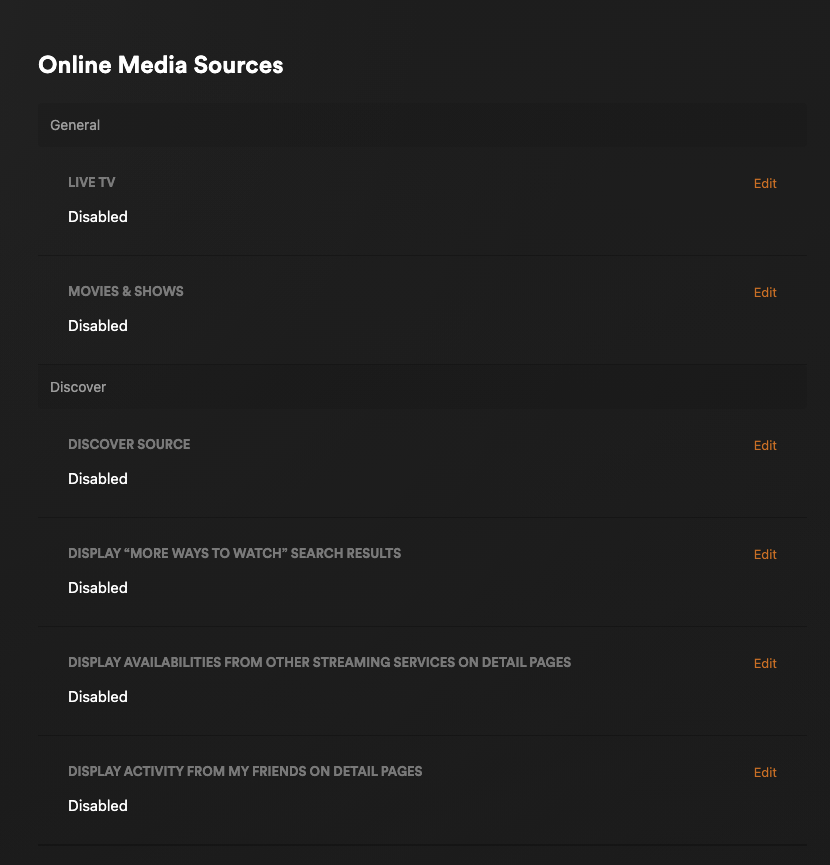
Set your quality to maximum on every device you use Plex on. This prevents transcoding, which slows the server for everyone.
Detailed settings guide for every device →

When playing a video, verify the quality shows "Original" (not a resolution like 720p or 1080p).

Clean up Plex so you only see content from Stump Server.
Before texting Stump, always check the server status page first. If Plex is down, Stump already knows and will fix it ASAP.
Check Server Status →
The status page is also linked from the top navigation on stumpserver.com — always one click away.
Green = all good. If you see red, Stump is already on it. Only text if it's been down for a while and status still shows green.
You're all set. Browse the library and enjoy. Just remember to always check that quality shows "Original" when playing.
Not sure what to watch?
Get personalized recommendations based on what's on the server.
What to Watch →Don't see something you want? Request it and you'll get an email when it's ready.
Sign in with your Plex credentials to make requests.
Request Content →Enjoy Stump Server. If anything breaks or you have questions, text Stump.